Playwright scripts
Build a script from a passing autonomous test, understand its states, and download the files.
When the AI agent passes a scenario, Qarmiq can turn what it did into a Playwright script. On later runs the script goes first and costs no AI call. If it fails, the agent checks again, and when the product still works the script updates itself. A script never records a failure on its own word.
Where a script comes from
Scripts are made on the result page of an autonomous scenario test. Open it from Test log in a run. See Autonomous test results.
A single check cannot be scripted on its own, so a test of one check has no script panel. A scenario test shows the Playwright script panel.
Build one
- Build a script appears when the whole scenario passed.
- Build a script from what passed appears when only some checks passed. The script covers those, and the rest are listed as gaps.
Select the button. The page updates itself while the script is made.
The states
The badge at the top of the panel says where it is:
| State | Meaning |
|---|---|
| Waiting to be drafted | Queued. |
| Drafting | The AI is writing the script. |
| Waiting for a runner to prove it | The script is written and waits for a test runner. |
| Reading the proof | The runs are done and are being judged. |
| Verified | The script passed repeated runs, and a deliberately broken variant failed as it should. |
| Not verified | It did not hold up. The message says how many runs passed. Any script already in use stays in use. |
| Nothing could be scripted | No check could be turned into a script. The panel says why. |
| Could not be built | Something failed in the build. Try Build again. |
For a verified script, other engines are proved too. Badges for Firefox and WebKit read Passed, Waiting for a runner, or a failure such as Failed, a fix is being tried. A real difference in the app on another engine becomes a Cross-browser finding on Decisions.
What is in the script
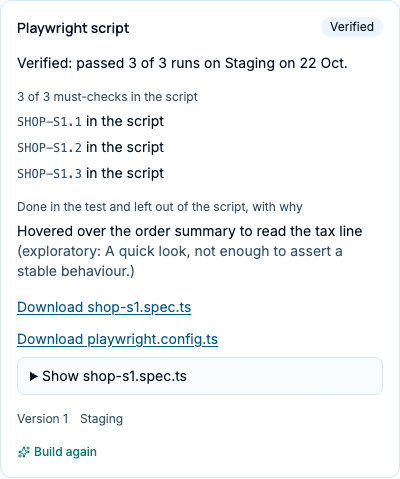
- A line such as “3 of 3 must-checks in the script, 0 left as gaps”. Each check is in the script or a gap, with the reason, for example “No test for it” or “It did not pass in any of 3 proof runs”.
- Beyond the checks lists behaviours the agent saw work that the judge confirmed, and whether they are in the script.
- Done in the test and left out of the script, with why lists what the agent did that is not worth asserting, each with a reason: exploratory, not repeatable, depends on data, already a check, or other.
- When a script is an update of one in use, a summary says what changed: Fixed, Removed, Added, or Failed and kept as it was.
Download it
Under the lists, each file has its own link:
- Download shop-s1.spec.ts, the test file.
- Download playwright.config.ts, the configuration.
Select Show beside a file to read it in the page first. The files are plain Playwright tests. The panel also shows the script’s version and the environment it was proved on.
Update it
Build again makes a fresh script from this test. Only the script that passes verification replaces the one in use.
Find scripts across the project
- A scenario’s page shows how it is tested, such as “Agent: no script yet” or a script.
- The automation page counts checks by who tests them. See Areas, automation and risk.
Last verified against the product on 28 October 2026.