Manual test log
See everything a tester did on your app during a Test manually session, and what they concluded.
When someone tests with Witness, Qarmiq keeps a log of the session. In a run, select Test log beside a scenario, then open the manual test.
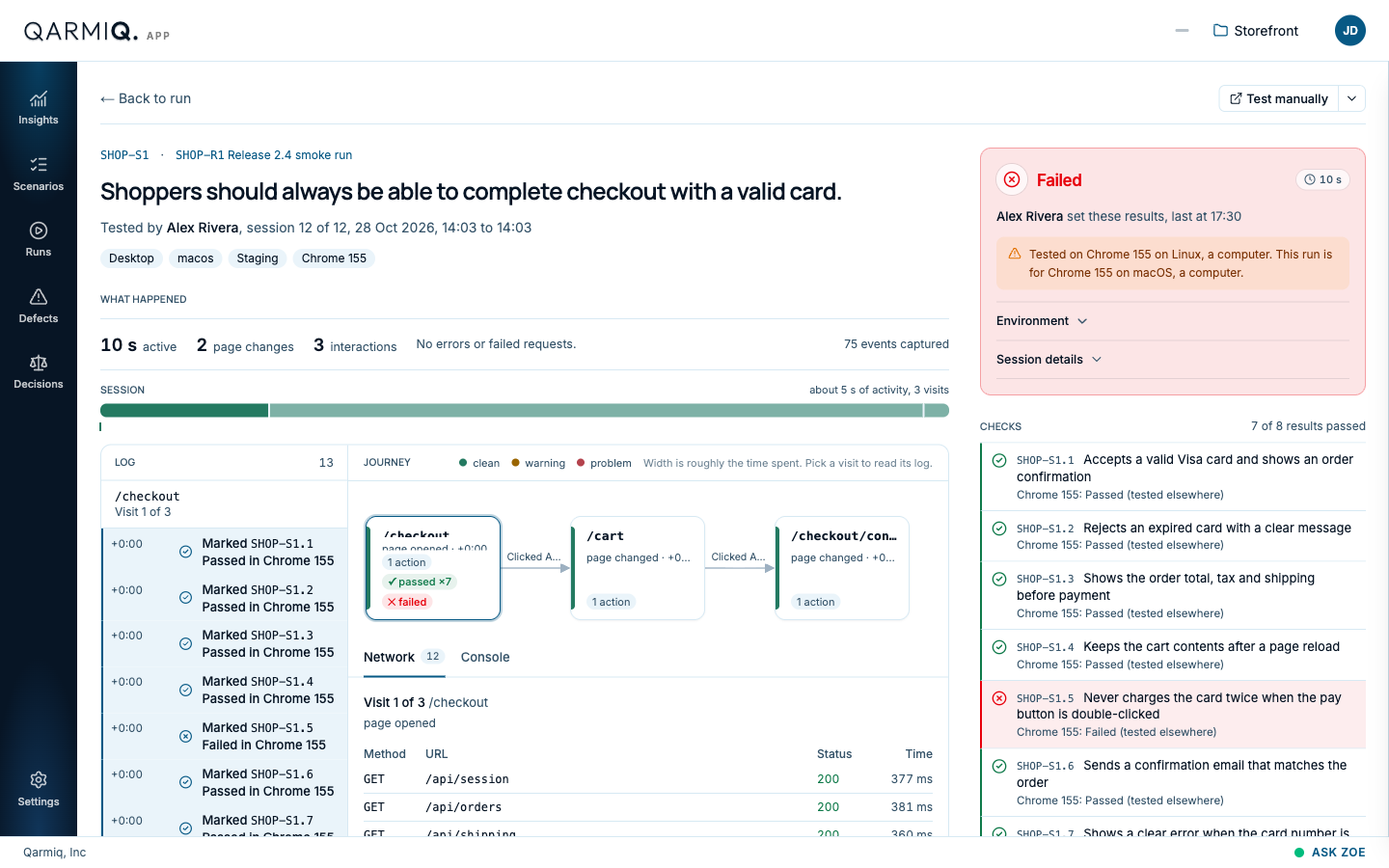
The top names the scenario and the run, who tested, which session it was (such as “session 12 of 12”), when it started and ended, and the device, operating system, environment and browser. Back to run returns to the grid.
The result
The card at the top right shows the tester’s result: Failed, Passed, or Not concluded while no result has been set. It also shows how long the session was active.
If the tester’s browser or operating system differs from what the run asks for, a warning says so, for example “Tested on Chrome 155 on Linux” against a run for macOS.
Environment and Session details open the facts behind the session.
What happened
WHAT HAPPENED sums up the session: how long it was active, how many page changes and interactions it had, whether any requests failed or errors appeared, and how many events were captured. The SESSION bar below shows where the activity fell.
Witness records steps, not video, and never what a tester types.
Choose what to see
Above the log, Everything shows every event and Problems shows only warnings and problems, with a count. If nothing went wrong, it says so. Values typed into fields are never recorded, and page addresses show the path only.
Log and journey
LOG lists everything in order, with the time since the session began: results the tester marked, groups of requests, and page loads. Choose a visit to read only its entries.
JOURNEY draws the visits as boxes joined by what the tester clicked to get from one to the next. A box’s width is roughly the time spent there. Its colour says whether the visit was clean, had a warning or had a problem.
Select a visit to read its log. Under the journey, two tabs show the selected visit:
| Tab | What it shows |
|---|---|
| Network | Each request with its method, address, status and time. |
| Console | Messages and errors from the page. |
Checks
CHECKS lists each check with the result the tester marked, such as “7 of 8 results passed”. A failed check is marked in red. A failure here can become a defect. See Defects.
OTHER TESTS OF THIS SCENARIO lists the scenario’s other manual and autonomous tests, with who tested, the result and when. Select one to open it.
Select Test manually to start another session. See Test manually and autonomously.
Last verified against the product on 28 October 2026.